Legal
Privacy Policy
Last updated: 2026-11-08
The short version
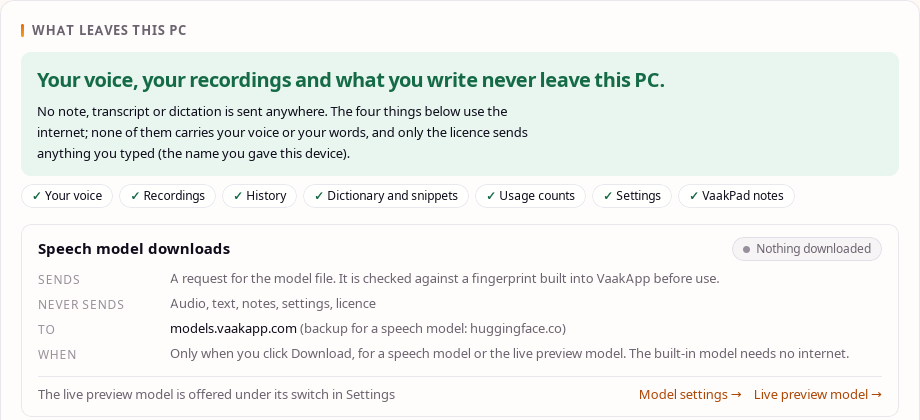
VaakApp is built so that there is almost nothing to collect. Speech recognition runs entirely on your device. Your voice, audio, and transcripts are processed and stored only on your computer — not as a matter of policy, but because the app contains no code that uploads them.
- Your voice never leaves your device.
- Speech-to-text runs 100% on-device — no cloud transcription, ever.
- No account, no tracking, and no analytics or usage data sent.
- Works fully offline, forever. The only network calls are an optional model download, a licence activation, an update check (when you ask, and once shortly after launch unless you turn that off in About), and — only when you click Download — the signed update itself.
What we collect
On your device (never sent to us)
Audio you dictate, the resulting transcripts, your settings, your personal Dictionary and Snippets, your VaakPad notes, and your usage stats all stay on your machine. A10I Tech Works Pvt Ltd cannot see any of them.
Three details worth stating precisely rather than glossing: usage stats are on by default — they are counts only (words dictated, sessions, fixes applied), never the text itself, they are written to a file on your computer, and you can turn them off in Settings. Dictation history is written to a file on your computer by default — that file holds the text of what you dictated. It never leaves your device. You can switch it off in Settings, and Clear History deletes the file; the app tells you if it could not. Whether the audio of each dictation is saved depends on your version: in VaakApp 1.0.0, the current Windows release, it is off unless you turn it on; from version 1.0.1 it is on by default. Saved audio is a sound file on your computer beside its transcript. It never leaves your device and nothing deletes it for you. You can switch it off in History or Settings, and delete any clip on its own; switching it off does not delete clips already saved.
Your clipboard, and what dictating does to it
VaakApp types your words into the focused app in one of two ways, and Clipboard + Ctrl+V is the fresh-install default: it puts your words on the clipboard for about half a second after the last paste. Simulate keystrokes is the alternative, and it never touches your clipboard. In the terminals it recognises, where Ctrl+V is not paste, VaakApp types whichever you choose. This distinction is worth stating plainly, because the clipboard is a surface other software can watch.
- Simulate keystrokes (optional) never touches the clipboard at all. It types character by character, so it is slower on long text.
- Clipboard + Ctrl+V (the default on a fresh install). This faster method puts your dictated text on the system clipboard, pastes it, and puts your previous clipboard text back about half a second after the last paste. While it is there — like anything you copy — any program running on your computer could read it. Two qualifications we would rather make than have you assume otherwise: in Live dictation mode, which pastes each phrase as you speak, "the last paste" means the end of the whole dictation, not of each phrase; and what is put back is text only, so if what you had copied was an image or a file selection, dictating replaces it (the app says so in History rather than letting you find out later).
- Windows clipboard history and cloud clipboard are excluded. VaakApp marks both of those writes — the dictation and the restore — with the flags Windows provides for exactly this, so the text is kept out of the Win+V history and is never uploaded to Microsoft's cloud clipboard, even if you have those Windows features switched on. (Both are off by default in Windows.)
- Third-party clipboard managers are a weaker guarantee, and we will not overstate it. The same marker asks clipboard managers to skip the entry, but that is a convention rather than something Windows enforces: a manager that checks for it will skip your dictation, and one that does not will capture it like any other copy. Nothing in the operating system prevents that.
On a Mac. The Mac version, 1.0.1 (being tested, not yet offered for download here), uses the clipboard the same way when Clipboard + Ctrl+V is chosen. The Windows markers above do not exist on a Mac, and 1.0.1 writes a dictation to the clipboard as an ordinary entry, so a Mac clipboard manager may keep it. It is also not kept out of Universal Clipboard: while Handoff is on, macOS can make what is on the clipboard available to your other Apple devices signed in to the same Apple Account. If that matters to you, turn Handoff off in System Settings, or choose Simulate keystrokes, which never touches the clipboard. There is no Linux version yet.
What leaves your device, and when
There are no network requests at all while you dictate. These are the only requests VaakApp can make. You start every one of them, except one update check shortly after launch, which you can switch off in About:
- Optional model download. Only when you click Download, for a speech model or for the live preview model, VaakApp requests that file from a pinned, allow-listed host — VaakApp's own model host (models.vaakapp.com), with Hugging Face as a backup — and verifies it against a checksum before use. It sends no audio, transcripts, notes, settings, stats or licence data. As with any web request, the host sees your IP address, the model path you asked for, and ordinary connection metadata — we mention it because an IP address is personal data, and a privacy policy that said "nothing is sent" would be glossing over that.
- Update check. Only when you press "Check for updates", or shortly after launch while the launch check in About is switched on, VaakApp fetches a small release manifest from download.vaakapp.com and compares it locally. It sends nothing about you or your installation — the host sees your IP address and ordinary connection metadata.
- Update download. Only when you press "Download update" after a check has found a newer version, VaakApp fetches that version's installer (about 250 MB — the speech model is inside it) from the same host. Before it can be installed the file is verified against a signing key built into the app; a file that does not verify is discarded. Installing is a further, separate click. Nothing about you is sent, and nothing is downloaded on launch, on a timer, or without you asking.
- Licence. Only when you press Activate, Check now or Deactivate in the License section; the licence never checks on its own. VaakApp sends your licence key, this computer's activation number, and a label so you can tell your own machines apart in your activation list. That label is a name for this device: the one you chose when activating (your computer's name is offered only as a suggestion), or, for an activation made before you could choose, your computer's name, which on many computers contains a person's name — we'd rather say so than let you discover it. These requests go to the licensing service run by our payment provider. No hardware fingerprint is involved: nothing reads your MAC address, disk serial or motherboard ID, and no audio or transcript is ever sent.
Purchases
Payments are handled by our payment processor (merchant of record). We receive the information needed to fulfill and support your order (such as your email and order details). We do not store your full card number. Please also review the processor's own privacy policy at checkout.
This website
vaakapp.com sets no cookies and uses no advertising pixels or cross-site trackers. Each page runs one small script of our own that tells our own server which page you opened; what that records is under “What this site counts” below. Its fonts are self-hosted, so loading a page doesn't announce your visit to anyone else either. There is no consent banner because there is nothing to consent to. Our hosting provider processes your IP address and request metadata in order to serve the page and to defend against abuse, as any web host must.
To show prices in your currency, our hosting provider tells the site which country your connection comes from. For the currency it is used for that one page and not kept; the counts described below keep it in total, beside the page or button, and never with anything about you. If you switch the currency by hand, that choice is kept in your own browser only.
Two pages are an exception, and only two. The waitlist
form on /download and the support form on
/support are protected by Cloudflare Turnstile,
an anti-spam check that loads a script from
challenges.cloudflare.com and looks at your browser and network
characteristics to tell a person from a bot. It is the only script this
site loads from another company's servers, it runs on those two pages
and nowhere else, and it is there to stop the forms being abused rather
than to learn anything about you. No other page fetches anything from
anyone but us.
What this site counts. Our own server counts a few
things in total, never per person. It started on 16 September 2026
with our advertising links, was corrected on 17 September, and was
widened on 8 November 2026 to the buttons and downloads on every page,
and to page views. It works like this: when a page you open has
loaded, one small script of our own tells our server which page it
was, and that is counted as a view; links in our advertising point at
/go/try, which counts the visit and shows you the landing
page; the main buttons on this site, such as Download,
Email me at launch and Follow on X, go through
/go/cta, which counts the click; and the download buttons
go through /go/download, which counts the download. Each
then sends you where the button said it would.
Every count records when it happened and which step it was.
A view adds which page it was and the country your connection comes
from. An advertising count adds a short campaign label taken from the link
you clicked. A button count adds which button it was (for example,
the one at the top of the home page, or the one in the menu), the page
it was on, where it was taking you, and the country your connection
comes from, which our hosting provider works out and passes to the
site. A download count adds which download it was (for example,
Windows) and the country. They do not record your IP address,
your browser's user-agent string, the page you came from, any query
string, or any advertising click id (such as gclid or
fbclid), and they set no cookie, so one click cannot be
connected to another or to you. No advertising network and no
analytics company receives any of it. That is the trade we chose: we
can see how many people pressed each button, on which page and from
which country, and we cannot see who they were. Page views and these
three addresses are the only things this site counts. The page-view
script sends only the page and, through our hosting provider, your
country: it sets no cookie, stores nothing on your device, sends
nothing that tells you apart from anyone else, and talks to no one but
our own server. If JavaScript is off, nothing is sent and your visit
is not counted. Joining
the waitlist is not counted here: each signup is the record described
under “Email you give us” below.
If we ever add analytics beyond that it will be a cookieless, privacy-respecting option that does not identify individual visitors, and we will say so here before turning it on. A brand that promises privacy should not surveil its own visitors.
Email you give us
If you email us, we keep your message and address only to reply. We do not sell, rent or share it, and we will delete it if you ask.
The support form is the same thing by another route: your name, your email address, your message, and anything you paste into it — including a diagnostic report, if you choose to send one — are stored in our own database, on infrastructure we rent from our hosting provider, and used to answer you. Writing to us does not add you to any mailing list.
Two things about that form we would rather state than have you assume. VaakApp never fills it in and never sends anything by itself — a diagnostic report is written on your own machine, for you to read and paste in yourself, which is why you can see exactly what you are sending before you send it. And, as with the waitlist form, each submission is stored together with your IP address, the country the request came from and your browser's user-agent string, which is how abuse of the form is spotted and blocked.
If you join the launch waitlist, your email address (and your name, if you chose to give one) is stored in our own database, on infrastructure we rent from our hosting provider, together with the date and the exact wording of the notice you agreed to. We also record the referring page and any campaign parameters in the link you arrived through, so we can tell which announcements actually reached people.
Today that address goes to no one else — not even a mailing platform. Nothing is sent to you when you sign up, which is why there is no confirmation email to look for. When VaakApp launches we will move the list to a third-party email platform in order to send the announcement, and that email will carry a one-click unsubscribe. We are telling you now rather than at launch, because you should know who will eventually hold your address before you decide to give it to us.
To be removed beforehand, email support@vaakapp.com. Be aware this is a manual step at our end rather than a self-service link, so allow us a few working days; we delete the record outright, and because it was never passed to anyone else there is nothing left elsewhere to chase.
How long we keep things
Order records are kept while your licence is valid and afterwards only for as long as tax and accounting law requires us to. Support emails, and messages sent through the support form, are kept for up to two years so we have the history if you write again. Waitlist addresses are kept until you ask us to remove you, or until the launch announcement has been sent and the list has served its purpose. Everything else lives on your own computer, where its lifetime is entirely up to you.
Your rights
Because your dictation data lives on your device, you are already in control of it — uninstalling VaakApp and deleting its data folder removes it, with no request to us needed and nothing left on a server of ours.
For the little we do hold — order records, and any email you sent us — you can ask for a copy, ask us to correct it, ask us to delete it, or object to how we use it. Email support@vaakapp.com and we will respond within 30 days. You can also complain to your local data protection authority if you think we have got something wrong.
Depending on where you live these rights come from different laws — the GDPR in the EU/EEA and its UK equivalent, India's Digital Personal Data Protection Act, and others. We apply the same answer to everyone rather than sorting people by jurisdiction: ask, and we will do it.
Where your data is handled
A10I Tech Works Pvt Ltd is based in India, so the order records and emails described above are handled there. Your dictation never leaves your own computer, so it is not transferred anywhere at all.
Children
VaakApp is a productivity tool for adults. It is not directed at children, we do not knowingly collect data from anyone under 18, and we do not profile or advertise to children. If you believe a child has sent us personal data, email us and we will delete it.
Changes
If this policy changes we will post the new version here and update the date above. If a change materially affects information we already hold, we will say so prominently on this site and in the app before it takes effect.
Contact
VaakApp is made and operated by A10I Tech Works Pvt Ltd, located at No. 38 (old no 54), F16, 3rd Main Road, 7th Block, Jayanagar, Bangalore, Karnataka 560041, India, which is the data controller (data fiduciary) for the information described here.
For anything about privacy, including a request about your data or a complaint, email support@vaakapp.com. That address reaches a person, and it is also the grievance contact for data-protection requests. If you write to us about a privacy matter and do not hear back, write again with "escalation" in the subject.